
Safeguarding Your WordPress Site: How CleanTalk Banishes Spam
Spam is a relentless foe for any WordPress website owner. From annoying comment spam cluttering your moderation queues to malicious bot registrations that compromise user data, the constant barrage of unsolicited content can severely impact your site’s performance, SEO, and credibility. Traditional methods like CAPTCHAs often frustrate legitimate users, leading to a poor user experience and increased bounce rates.
Fortunately, there’s a powerful and elegant solution that works silently in the background to protect your site: CleanTalk. This anti-spam plugin offers comprehensive protection without making your users jump through hoops. Let’s dive into how CleanTalk can be your ultimate spam-fighting weapon for WordPress.
What is CleanTalk?
CleanTalk is a cloud-based anti-spam service designed specifically to stop spam bots and spam comments on websites. Unlike many other solutions, it identifies and blocks spam before it even reaches your site, acting as a powerful shield. It works by analyzing user behavior and data against a continuously updated global database of spam threats, ensuring real-time protection.
How CleanTalk Protects Your WordPress
CleanTalk provides multi-layered protection across various aspects of your WordPress site, ensuring comprehensive security from unwanted intrusions.
Protecting Comments Fields
One of the most common targets for spammers is the comments fields section of your blog posts. Without robust protection, these fields can quickly become inundated with irrelevant links, promotional messages, and even malware. CleanTalk works by filtering submissions in real-time, allowing only legitimate comments to appear. It doesn’t use any irritating CAPTCHAs, so your users can comment freely, enhancing engagement without the hassle.
Safeguarding User Registrations
Spam registrations are another major headache, leading to fake accounts that can consume server resources, send spam emails through your system, or even pose security risks. CleanTalk monitors new user registrations, detecting and blocking bot attempts before they create an account. This keeps your user database clean and secure.
Blocking Spam Bots Everywhere
CleanTalk’s protection extends far beyond just comments and registrations. It actively blocks spam on:
- Contact forms (e.g., Contact Form 7, WPForms, Gravity Forms)
- WooCommerce product reviews and checkout forms
- Newsletter subscriptions
- Booking forms
- Feedback forms
- Any other form on your WordPress site that might be targeted by bots.
This comprehensive coverage ensures that virtually every entry point for spam on your website is secured.
Simple Installation: Getting Started in Minutes
One of the standout features of CleanTalk is its simple installation. You don’t need to be a tech wizard to get it up and running. The process is remarkably straightforward:
- Install the Plugin: From your WordPress dashboard, navigate to
Plugins->Add New. Search for “CleanTalk Anti-Spam” and clickInstall Now, thenActivate. - Get an Access Key: The plugin will prompt you to create a CleanTalk account or log in if you already have one. You’ll receive an access key (usually sent to your email after a quick registration).
- Enter the Key: Copy and paste the access key into the designated field in the CleanTalk plugin settings.
- Save Changes: Click
Save Changes, and that’s it!
Once activated, CleanTalk immediately begins its work, protecting your WordPress site without requiring any further configuration from your end. The entire setup typically takes less than five minutes.
Key Benefits of Using CleanTalk
Beyond its core function, CleanTalk offers several significant advantages for WordPress users.
Real-time, Invisible Protection
CleanTalk operates silently in the background, making it virtually invisible to your legitimate users. They won’t encounter CAPTCHAs, quizzes, or puzzles, ensuring a smooth and uninterrupted browsing experience.
Enhanced User Experience
By eliminating frustrating CAPTCHAs, CleanTalk dramatically improves the user experience on your site. This can lead to higher engagement, more comments, and increased conversions, as visitors aren’t deterred by security hurdles.
Detailed Spam Statistics
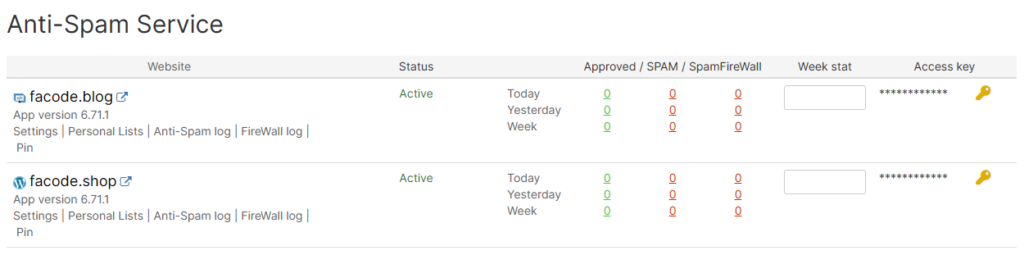
The plugin provides comprehensive statistics right within your WordPress dashboard and on the CleanTalk control panel. You can see how many spam attempts have been blocked, where they originated from, and which forms they targeted. This transparency gives you valuable insights into your site’s security.
Cost-Effective Solution
Considering the extensive protection it offers, CleanTalk is remarkably cost effective. The amount of time and resources it saves you by eliminating manual spam moderation, cleaning up fake accounts, and preventing potential security breaches far outweighs its subscription cost. It’s an investment that pays for itself by maintaining your site’s health and reputation.
First, you get 7 days to try it out for free. Once that’s over, you’ll pay $24 each year for 3 websites.
Why CleanTalk is a Smart Choice for WordPress Users
In a world where digital threats are constantly evolving, having robust, reliable anti-spam protection is non-negotiable for any WordPress site. CleanTalk offers a powerful, user-friendly, and highly effective solution that works silently to keep your site clean and secure. It frees you from the burden of spam moderation, allowing you to focus on creating content, engaging with your audience, and growing your online presence.
Conclusion
Don’t let spam compromise your WordPress website. With its easy setup, comprehensive coverage across all comments fields and forms, and commitment to a seamless user experience, CleanTalk stands out as an indispensable tool for safeguarding your site. Embrace the peace of mind that comes with real-time, intelligent spam protection, and let CleanTalk handle the bots while you focus on what truly matters.